Professional retouching is what separates a gallery of technically correct images from one that actually moves people. It removes the distractions a camera captures but the eye ignores — a stray hair, a color cast from a venue's overhead lights, a blown highlight on a white gown — so the emotion in each frame can land cleanly. Studios like Larsonprophotography build retouching into their client workflow precisely because polished imagery has been shown to deliver a 20–30% lift in engagement and conversion compared to unretouched equivalents. Before you sign any photography contract, confirm three things in writing: the number of fully retouched images, the color profile used for print files, and the file types you will receive.
Table of Contents
- Why professional retouching matters more than basic editing
- What does retouching actually improve in wedding images?
- What do retouchers actually fix in wedding photos?
- What should you expect for deliverables, pricing, and turnaround?
- How do you evaluate a photographer's retouching skill?
- How to read before/after examples in a portfolio
- Key Takeaways
- The case for subtlety over perfection
- Larsonprophotography's approach to retouching in San Antonio
- Useful sources
Why professional retouching matters more than basic editing
Editing and retouching are not the same job. Basic editing applies global adjustments — exposure, white balance, contrast — across a batch of images, often through presets or Lightroom profiles. It is efficient, and every photographer does it. Retouching is a more detailed process that addresses what global edits cannot: a specific shadow under one eye, a color cast on the groom's jacket that differs from the rest of the sequence, a distracting vendor logo in the background of a reception shot.
The technique that separates skilled retouchers from preset-appliers is frequency separation. It splits a portrait into a texture layer and a tone/color layer, so a retoucher can smooth uneven skin tone without erasing the pores and fine detail that make a face look real. That distinction matters enormously for wedding portraits, where over-smoothed skin reads as artificial in large prints.
Who does the retouching also changes the price and turnaround. Some studios handle it in-house; others send files to a vetted specialist. Either model can produce excellent results, but you should ask which one applies before you book.
Pro Tip: When reviewing a portfolio, look at sequences of 10–15 images from a single event, not just hero shots. If the tones, skin rendering, and shadow depth feel consistent across the whole set, the photographer is retouching with intention. Inconsistency across a sequence is the tell.
What does retouching actually improve in wedding images?
The clearest benefit is consistency. A wedding day spans multiple lighting environments: a dim church, a bright outdoor ceremony, a reception with mixed tungsten and LED fixtures. Without retouching, those shifts show up as jarring tonal jumps in the album. With it, the gallery reads as a single visual story.
Color accuracy is the second major gain, and it has real downstream consequences. Accurate color reproduction prevents the situation where a bride's ivory gown prints as cream or a bridesmaid's dusty rose dress looks mauve in the album. Florists and dress designers who use client images for their own marketing also depend on color fidelity.
| Benefit | Why it matters for weddings |
|---|---|
| Consistent tone across sequences | Album pages feel cohesive, not jarring |
| Accurate color for prints | Gown, floral, and décor colors reproduce correctly |
| Distraction removal | Attention stays on faces and moments |
| Emotional clarity | Expressions read without competing visual noise |
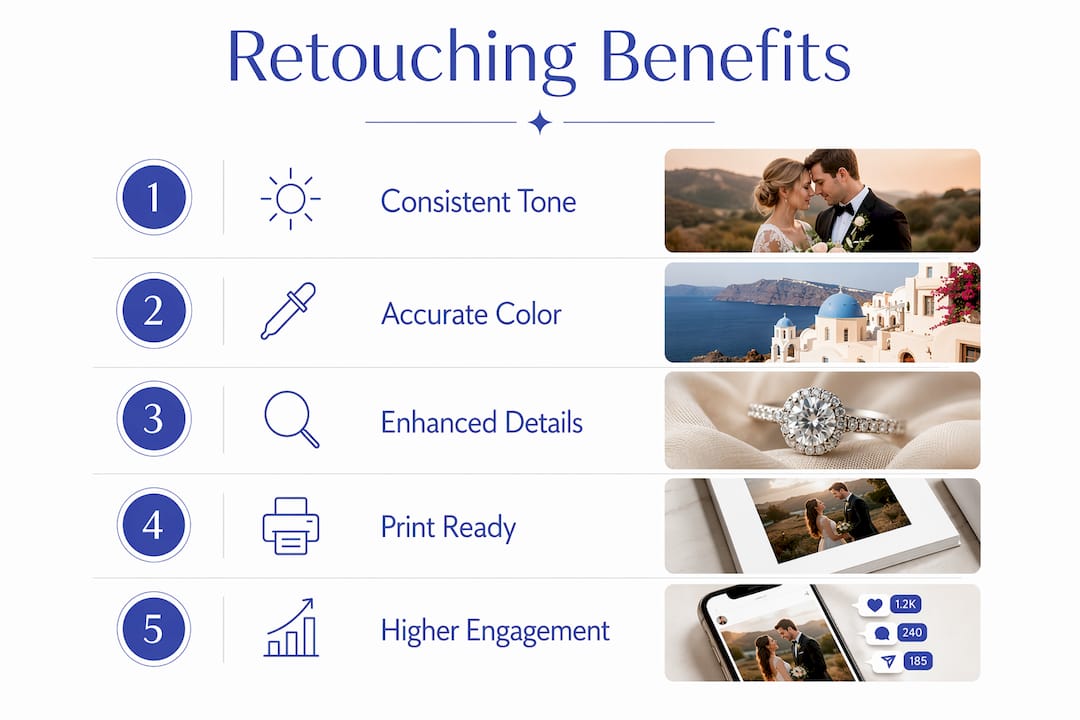
Retouched images also perform better on social feeds and vendor galleries. Visual content drives higher engagement than unpolished alternatives; e-commerce research finds standardized and retouched images can drive a 20–30% lift in click-through or conversion, which matters when couples share their gallery or when a photographer's portfolio is doing the work of attracting new clients.
One practical note on prints: sRGB is the standard color profile for consumer labs and online galleries; Adobe RGB preserves a wider gamut for professional print labs. Ask your photographer which profile they deliver and whether they offer both.
What do retouchers actually fix in wedding photos?
Most retouching work falls into a handful of categories couples rarely think about until they see the before-and-after.
Standard fixes include stray-hair cleanup around the face and veil, minor blemish removal that preserves skin texture, color-cast corrections on skin tones under mixed lighting, and background cleanup for distracting elements like a visible cord, a sticker on a mirror, or an uninvited guest in the frame. Background cleanup and reflection management are among the most time-consuming tasks when done carefully, which is why they drive cost.
More advanced work appropriate to weddings includes compositing multiple exposures for a ceremony shot where the interior and the bright window behind the altar both need to be properly exposed, selective sharpening on ring detail shots and lace veil textures, and seam or bustle smoothing on gowns when fabric folds read as unflattering in a specific pose.
One area worth discussing with your photographer directly: body sculpting. Subtle posing adjustments during the shoot are standard. Digitally reshaping a body in post-production is a different matter, and many photographers decline it on ethical grounds. If you have preferences, state them before the shoot, not after delivery. The ethics of wedding photography retouching is a topic worth reading before you finalize your contract.
What should you expect for deliverables, pricing, and turnaround?
Get these specifics in writing before you sign:
- Number of fully retouched images — not just "edited." Ask how many receive individual, manual attention versus batch-processed global edits.
- Number of lightly edited images — most studios deliver a larger set of color-corrected images plus a smaller set of fully retouched selects.
- File types — JPEG for web and sharing; TIFF or high-resolution JPEG for print.
- Color profile — sRGB for standard labs, Adobe RGB for professional print houses.
- Print-ready files — confirm resolution (300 dpi minimum for print) and whether the studio handles output optimization for your album printer.
On pricing: basic retouching typically adds 20–40% to a shoot's post-production cost, while heavy compositing work can double it. Studios price retouching as a per-image fee, an hourly rate, or as part of a tiered package. When retouching is bundled into a full-gallery package, ask what "included" actually means — some studios include light retouching on all images and offer full retouching on a per-image basis as an add-on.
Turnaround for a full wedding gallery with retouching typically runs 4–8 weeks. Heavy compositing or large image counts push that toward 10–12 weeks. Expedited delivery is usually available for an additional fee; ask about it before the wedding, not the week after.
Pro Tip: Request this language in your contract addendum: "Photographer will deliver [X] fully retouched images in sRGB JPEG at 300 dpi and [Y] color-corrected images in JPEG, within [Z] weeks of the event date. Client is entitled to [N] rounds of revision on retouched selects."
How do you evaluate a photographer's retouching skill?
Ask these questions during your inquiry call:
- Who performs the retouching — the photographer, an in-house editor, or an outsourced specialist?
- How many images receive full manual retouching versus batch editing?
- Can you show me before-and-after examples from a recent wedding?
- What is your revision policy for retouched images?
- How do you verify color accuracy for print labs?
Red flags to watch for: a portfolio where skin texture varies wildly from image to image (over-smoothed in some, untouched in others), an inability or unwillingness to share before-and-after examples, a retouching policy that is vague or absent from the contract, and surprise upcharges for retouching that was implied to be included.
Pro Tip: To verify color accuracy for prints, ask the photographer if they calibrate their monitor with a hardware colorimeter (tools like the X-Rite i1Display are standard in professional workflows). An uncalibrated monitor is the most common reason prints look different from screen previews.
How to read before/after examples in a portfolio
When a photographer shares before-and-after samples, look for these markers of quality:
- Preserved skin texture — pores and fine lines should still be visible after retouching; a "plastic" finish is a sign of over-smoothing.
- Natural lighting continuity — the direction and quality of light should not change between the before and after.
- Consistent color across sequences — pull up 10–15 images from the same event and check whether skin tones, shadow depth, and overall warmth stay stable.
- Targeted background fixes — cloned areas should show no repeating patterns or smearing artifacts.
- Emotional integrity — expressions and eyes should look exactly as they did in the original; retouching should never flatten or alter a genuine moment.
Good before/after comparisons show small, specific improvements. If the before and after look like two different photographs taken on different days, the retouching is too heavy. For more on what a strong portfolio should demonstrate, the photography portfolio guide covers what to look for when evaluating a studio's body of work.
Key Takeaways
Professional retouching delivers cohesive, print-ready wedding galleries by addressing technical distractions that editing alone cannot fix, and specifying deliverables in your contract is the single most effective way to protect that outcome.
| Point | Details |
|---|---|
| Retouching vs. editing | Retouching is manual and image-specific; editing is global and batch-applied. |
| Engagement and conversion | Retouched images show a 20–30% lift in engagement and conversion versus unretouched equivalents. |
| Print color accuracy | Specify sRGB or Adobe RGB in your contract to prevent color surprises in albums and prints. |
| Cost signal | Basic retouching adds 20–40% to post-production cost; heavy compositing can double it. |
| Larsonprophotography | Larsonprophotography builds retouching into its San Antonio wedding packages, with clear deliverables and before/after examples available on request. |
The case for subtlety over perfection
Most couples come into the retouching conversation with one of two fears: that their photos will look over-processed and fake, or that they will receive raw-looking images with every flaw intact. The truth is that neither extreme serves the work.
The photographers and studios that get retouching right treat it as a tool for clarity, not correction. The goal is never a technically flawless image. It is an image where nothing pulls your attention away from the moment. A well-retouched wedding gallery should make you feel like you are back in that room, not like you are looking at a magazine spread.
What I find couples underestimate is how much retouching decisions are made before the camera comes out. Lighting choices, backdrop selection, and posing all affect how much post-production work an image needs. Studios that plan shoots with retouching in mind — choosing lighting setups that minimize color casts, for example — spend less time fixing and more time refining. That is where the real craft lives.
Larsonprophotography's approach to retouching in San Antonio
Larsonprophotography delivers wedding and engagement galleries where retouching is built into the package, not an afterthought or an upcharge. Every full wedding package includes a specified number of fully retouched selects alongside a complete color-corrected gallery, delivered in print-ready files with a clear turnaround timeline.
Couples who want to see the difference firsthand can view engagement session examples and request before/after samples during the inquiry process. The studio's retouching policy, revision rounds, and file specs are available in writing before any contract is signed. To check availability for your date or ask about what retouching is included in a specific package, reach out through the clients page and get the details you need to make a confident decision.
Useful sources
- Benefits of Retouching in Ecommerce Photography — Retouching Labs: engagement, conversion, and return-rate data used in the benefits and key takeaways sections.
- Why Every Professional Photo Needs Retouching — Outline Media Solutions: process description distinguishing retouching from batch editing.
- Product Photography Retouching: What Happens After the Shoot — 51st & Eighth: scope of common retouching tasks and cost-impact data.
- What Are the Benefits of Image Retouching? — WK360: color accuracy and swatch-matching benefits for fashion and wedding imagery.
- Why Photo Retouching Isn't About Perfection — Kalie Berkey: editorial perspective on cohesion, strategy, and the limits of over-editing.
- Post-production in Photography: A Pro Guide — Larsonprophotography blog: explains the full post-production pipeline for couples new to the terminology.
- The Role of Color Grading in Wedding Photography — Larsonprophotography blog: how color grading fits into the broader retouching workflow.